The information below is provided for those who seek to learn more about the technical issues of digital cinema.
What does “DCI compliant” mean, and which products are DCI compliant?
Are the digital cinema standards finished?
Are SMPTE standards used in distribution today? If not, then how is content distributed?
How do I know if a product follows the latest SMPTE standards?
How do I know if a product meets the high frame rate requirements?
How do I know if a product meets accessibility requirements?
Where can I learn more about Inter-Society’s ISDCF?
What is the difference between 4K and 2K projection?
Do I need a 4K projection system to play a 4K movie?
Can I use a single lens to project both scope and flat images?
Can I use an anamorphic lens on my projector?
How are security keys (KDMs) delivered?
How are KDMs controlled?
What other conditions will cause a movie to not play?
What is a Facility List Message?
Do I need a Theatre Management System (TMS)?
What do I need to know about digital 3D?
Can a single projector display 3-D images with full (4:4:4) color representation?
What questions should I ask of digital cinema system providers?
What is the anticipated lifespan of DLP projectors?
What work remains in digital cinema?
What is the status of digital cinema today?
What is DCI?
DCI is the abbreviation for Digital Cinema Initiatives, an organization whose owners are the six major motion picture studios (the same six studios that also comprise the MPAA). In July of 2005, DCI issued version 1.0 of its Digital Cinema System Specification, representing the consensus of DCI’s members in regards to many technical details of digital cinema. The DCI specification can be thought of the cinema equivalent to the consumer specification of the Blu-ray format. Note that the DCI specification is not a standard. Standards for digital cinema are the domain of the Society of Motion Picture and Television Engineers (SMPTE). A copy of the most recent DCI specification (v1.3) can be downloaded from the DCI website. The latest version incorporates over 200 errata issued since the original release of the specification in 2005.
What does “DCI compliant” mean, and which products are DCI compliant?
“DCI compliant” is a term used to describe products that conform to the DCI specification. Products that have been tested per the DCI Compliance Test Plan (CTP) are posted at the DCI compliance web site.
Note that DCI compliance does not require compliance to the full set of SMPTE DCP standards. Support for standards such as those for accessibility, for example, are not included in DCI testing.
Are the digital cinema standards finished?
A full suite of cinema distribution and security standards exist. But standards require ongoing maintenance, and new technologies emerge, leading to new standards and recommendations over time.
Are SMPTE standards used in distribution today? If not, then how is content distributed?
All digital cinema products are designed to meet an informal specification called “Interop.” The Interop DCP (digital cinema package) is based on early draft standards to promote interoperability in the early phase of the digital cinema rollout. Interop DCP is similar to, but not compliant with, SMPTE DCP. It does not support many of the features incorporated in SMPTE DCP, most notably SMPTE audio specifications. The specifications for both Interop DCP and SMPTE DCP, as recommended by the ISDCF, are listed in the ISDCF SMPTE-DCP Transition Review.
Learn more about the DCP in Cinepedia.
How do I know if a product follows the latest SMPTE standards?
The short answer is that you don’t. There is no formal test available that will tell you if a product meets all SMPTE standards. It is recommended that those buying equipment include detailed specifications in their equipment purchase agreements. Note that simply asking for “DCI compliance” does not guarantee that all SMPTE standards are met, and does not guarantee that the product is ready for use in the cinema.
How do I know if a product meets the High Frame Rate (HFR) requirements?
The DCI specification requires all projection systems to support 48fps at 2K resolution. Frame rate higher than 48fps are a feature of most if not all projection systems today. However, many older projectors cannot manage frame rates beyond the DCI spec. The high frame rates of interest today are associated with 3-D, at 48fps-per-eye and 60fps-per-eye. This equates to 96fps and 120fps in the total frame rate count.
The bottleneck is the media block and server. An in-projector media block (IMB) is required for HFR, and most media blocks support at least 500 Mb/s bit rates, which should be sufficient for anticipated 48fps-per-eye (96fps) releases. However, other bottlenecks exist as well, such as storage transfer rates, and CPU processing power, that can introduce further limits in system performance. If you’re planning to play an HFR movie, test your system first. 500 Mb/s may itself prove to be a bottleneck for higher performance systems in the future.
How do I know if a product meets accessibility requirements?
Closed captions and accessible audio are included in the SMPTE distribution standards. They are not specified by DCI, however. As such, DCI compliance testing does not guarantee the presence or behavior of accessiblity features. To insure that these capabilities are in products you purchase, you should specify compliance to the ISDCF SMPTE DCP transition review.
Where can I learn more about the Inter-Society Digital Cinema Forum (ISDCF)?
The Inter-Society’s Digital Cinema Forum (ISDCF) is on the web at http://ISDCF.com. Inter-Society is an organization chartered to socialize issues across the industry. The ISDCF is not a standards body, nor is it a compliance or certification effort. However, it is an excellent organization for socializing the unique issues and solutions that pertain to digital cinema.
What is the difference between 4K and 2K projection?
“4K” is the term used to describe images that have approximately 4K vertical lines. In digital cinema, a 4K image with a 2.39:1 (“scope”) aspect ratio is delivered having 4096 x 1716 pixels. A 4K image with a 1.85:1 (“flat”) aspect ratio is delivered having 3996 x 2160 pixels.
“2K” is the term used to describe images that have approximately 2K vertical lines. In digital cinema, a 2K image with a 2.39:1 (“scope”) aspect ratio is delivered having 2048 x 858 pixels. A 2K image with a 1.85:1 (“flat”) aspect ratio is delivered having 1998 x 1080 pixels.
Do I need a 4K projection system to play a 4K movie?
No. 4K movies can be played on 2K projection systems with no modifications. Through the use of JPEG 2000 image compression technology, a 2K projection system will extract a 2K image from a 4K digital movie. Likewise, a 4K system will automatically scale the resolution of a 2K image for projection on a 4K projector. This capability results in the ability to share content between 2K and 4K systems, allowing a studio to deliver “single inventory” distributions (i.e., either 2K or 4K).
Can I use a single lens to project both scope and flat images?
According to NATO’s System Requirements 2.1, yes. But some studios interpret the DCI specification as opposing the use of a single lens for scope and flat images. A different interpretation of the DCI specification is that it prefers, but does not require, the use of separate lensing to project scope and flat images. If your systems are financed in part through VPF subsidies, then you should have this discussion with your deployment entity.
Can I use an anamorphic lens on my projector?
While anamorphic lenses are the best way to make efficient use of the light available to the projector, not all studios may accept their use. (See the discussion on Single Lens above.)
Note that an anamorphic lens in digital cinema does not rely on the distribution of anamorphically squeezed images, as with film. In digital cinema, the projector can electronically perform an anamorphic re-mapping of the image onto its electronic imaging device, requiring an anamorphic lens to correctly display the image. The benefit of this projection technique is that it utilizes the full imaging array, utilizing the maximum lamp power available. Images projected with an anamorphic lens can light up larger screens than in non-anamorphic installations. The anamorphic projection technique has proven useful for large screen 3-D presentations.
How are security keys (KDMs) delivered?
KDM is the acronym for Key Delivery Message. A KDM is required to play an encrypted movie. Each KDM allows one version of a movie to be played on the targeted digital cinema server or media block during a specified time period. The KDM carries security credentials for the movie in encrypted form, which can only be decrypted by the target device. Thus, a KDM delivered to the wrong server or wrong location cannot be decrypted and will not work, nor will such an error compromise the security of the movie.
The KDM is a small file, that, in legacy systems, is typically emailed to the exhibitor. Automated key delivery using the Facility List Message is now available.
Learn more about the KDM in Cinepedia.
How are KDMs controlled?
KDMs have a few conditions associated with their use:
- A KDM will only work for one movie title on one server.
- A KDM will only work within the prescribed engagement time period.
- The server will only work if connected to a projector that is listed in the Authorized Device List of the KDM. (Not all studios utilize the Authorized Device List.)
To play a movie on two servers requires two KDMs for the movie. This means that to move a movie to a 2nd server requires a 2nd KDM. The engagement time window of the KDM is set per the business requirements of the studio distributing the movie. If your KDM expires and you don’t have a new KDM to continue the engagement, then you cannot play the movie.
To create the KDM, the public key contained in the digital security certificate for the media block must be known. If the studio requires use of the Authorized Device List, then the public keys contained in the projector certificates must also be known. Certificates are digitally signed by the manufacturer, allowing those who make KDMs to know they’re encrypting keys for trusted equipment.
What other conditions will cause a movie to not play?
One of the “dark screen rules” of the DCI specification is that equipment will fail to function when a security sub-system is tampered with. To a theatre operator, this means that the security components of your equipment must be maintained by others who are certified to repair the security components. You will have to check with the equipment manufacturer to learn who is qualified for this role.
The DCI specification also requires the playout of a movie to fail if the forensic marking capability of the server is not functioning correctly. The server’s forensic marking system will mark the image and audio of the movie such that camcordered copies can be traced to the location of theft. If the marking system fails, then the server will fail to playout the movie. However, the studio can enable a flag in the security key to disable the marking system, which will also allow the movie to play with a failed marking system.
What is a Facility List Message?
The Facility List Message (FLM) is used in automated systems to carry the security information that exists in secure playback equipment to the KDM generating facility. This allows the correct KDM to always be created. The diagram below illustrates the relationship of the FLM to the KDM.
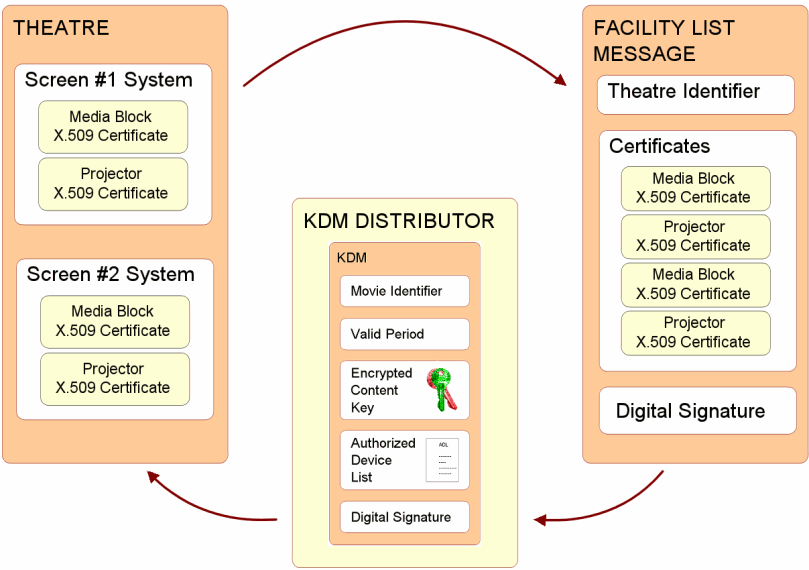
The Facility List provides security information for the creation of KDMs
Do I need a Theatre Management System (TMS)?
A TMS provides a multi-screen complex with centralized management of all screens. The TMS is your tool for scheduling and monitoring your shows. As to whether or not you’ll need one, that’s for you to decide.
What do I need to know about digital 3-D?
Digital 3-D bears some discussion. The term “3-D” is used in digital cinema to describe stereoscopic images, where left and right images are displayed on a 2-D screen, and a method for viewing these images is employed such that each eye only sees the intended images. The result is that the left eye sees a different image from the right eye, providing the stereoscopic effect.
The distribution of digital 3-D content is intended to be single inventory, where a single distribution works for all 3-D display methods.
While there are many techniques for creating 3-D images, there are only three “add-on” technologies available for viewing them when projected by a single digital projector. The add-on technologies can be classified as those using polarized glasses, those using active “shutter” glasses, and those using spectral (or color) filter glasses. See the MKPE article Choice in 3-D for an explanation of how the various 3-D add-on technologies work. All methods for projecting 3-D can display any form of digital 3-D content, regardless of how it was created.
Four questions can be asked of each method in differentiating the methods:
- What is the cost of the glasses?
- Do the glasses require washing?
- Does the method require use of a silver screen?
- How much additional cost is involved to move a 3-D movie to a 2nd or 3rd auditorium?
A fourth method for projecting 3-D images is dual-projection. Dual projection is often used to light up big screens. If dual projectors are used, the exhibitor should be prepared to regularly align them for 3-D presentation.
Can a single projector display 3-D images with full (4:4:4) color representation?
No. Single projector 3-D images are displayed in 10-bit 4:2:2 color representation. While it’s true that the DCI specification calls for 12-bit color with 4:4:4 color representation for 2-D images, the specification for 3-D distribution allows 4:2:2 color representation when displaying 3-D images. However, some servers support 4:4:4 color with dual 3-D projection.
What questions should I ask of digital cinema system providers?
Digital cinema has matured, and you’ll find that most system providers offer equivalent capabilities. However, it is still useful to ask the following questions of your systems provider:
- Moving the Movie: How long does it take to move a movie from one auditorium to another?
- Central Office Reporting: Will the system report to your central office the arrival of content and KDMs? Will it report when KDMs are only days away from expiration? (Note that more exceptions regarding content and KDM delivery are listed in NATO’s System Requirements.)
- Maintenance: Who maintains the system? What Service Level Agreements are offered?
- Security Log Data: The security policy in the DCI specification is “control lightly, audit tightly.” A security log may be requested by the movie distributor. Does your system give you the ability to view and approve your security logs before they’re sent?
- Security of Exhibitor Networks: The digital cinema system should not compromise the security of the theatre owner’s network. The transmission of security log data to suppliers should be under the exhibitor’s control. Is this how the system you are considering behaves?
- Review NATO’s Digital Cinema System Requirements: Download NATO’s Requirements. It contains a wealth of information that guided the early development of digital cinema.
What is the anticipated lifespan of DLP projectors?
The common lifetime estimate for DLP projectors is 10 years. Longer life is possible, but maintenance costs will increase with age and are likely to drive the replacement decision. These figures are provided only as rough estimates, without any warranty of actual equipment performance.
What work remains in digital cinema?
Digital cinema will evolve as new formats emerge. More on this subject at mkpeReport.
What is the status of digital cinema today?
In mid-2017, there are over 160,000 digital cinemas installed worldwide. This is a 75% increase from 2012, when some 90,000 systems were installed, and the US had only reached the 85% conversion point. Graphs showing the progress of digital cinema in 2012 are in a NAB 2013 presentation at mkpe.com.
Technology adoption cycles have been studied for over 20 years. Stagnant sales and lack of major market uptake following a successful early adopter period is indicative of what author-consultant Geoffrey Moore calls the chasm, and this stage appeared in the early rollout of digital cinema. The illustration below maps US digital cinema conversion onto the technology adoption curve of Geoffrey Moore.
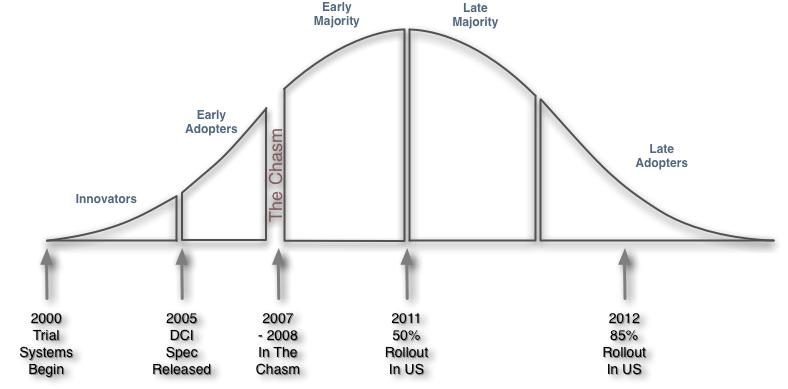 Digital Cinema Technology Adoption Curve