The information below is provided for those who seek to learn more about the business issues of the digital cinema transition.
What is a VPF?
How is the equipment financed?
Do I need to sign up with a 3rd party integrator to gain access to VPF financing?
Who do I talk to about digital cinema financing and VPF deals?
Is DCI the authority behind the VPF model?
Why is the financing of digital cinema so challenging?
Why can’t a studio simply credit film rental?
Why is 3-D a driver for digital cinema? Does 3-D cost extra?
Are all projectors capable of High Frame Rates (HFR)?
Does DCI require High Frame Rate (HFR) support?
What is the value of 4K and HFR to my audience?
Should I wait and buy used digital cinema equipment?
Is compliance with the DCI specification sufficient to receive a digital movie?
Are there any restrictions I should know about?
When will film distribution end?
Will my equipment become obsolete?
Probably one of the hottest topics for those attempting to finance equipment is that of equipment obsolescence. When addressing this issue, it’s best to think of digital cinema equipment in layers. There’s the “DCI” layer, which is the baseline for cinema. It’s the 35mm equivalent of digital equipment. Movies will be distributed in the baseline DCI format for decades. Note that while DCI does not specify accessibility, all manufacturers now support it. So we can include accessibility in the baseline DCI layer. Then there’s the feature layers: 3-D image, 3-D sound, higher frame rate, laser illumination. Lasers first: laser illumination is several years away from achieving regulatory approval. Once available, it will produce brighter images, but for a big price, not for a little price. A lot of stars have to line up before it’ll be in wide use, and by that time, your equipment should be paid off. Add-on technologies such as 3-D image, 3-D sound, and higher frame rates can be added later, as the name “add-on” implies. There’s a cost to add-ons. In this framework, one can think of a media block and server as an add-on, replacing the old with the new as desireable features become available, including higher compression bit rates. The point to remember is that your core investment in new equipment, in particular, your projector, won’t go down the drain when add-on technology allows new features to be added later.
What is a VPF?
The Virtual Print Fee (VPF) is a financing mechanism for funding the first purchase of digital cinema equipment in the replacement of film projectors. The VPF is a method for redistributing the savings realized by studios when distributing digital prints in place of film prints. It is an effective mechanism, but it is not a perfect mechanism. First run cinemas benefit the most from the VPF, as that’s where print savings actually occur.
The VPF is based on the payment of a fee per booking by content-suppliers. Early VPF programs were designed to achieve a neutral P&L for studios, such that the expense for delivering a digital print (including financing fee) plus VPF was no greater than the cost of delivering a film print. Contemporary VPF programs are often designed to recoup a smaller portion of costs over a fixed term, often 5-6 years. Payment of the VPF will terminate once the equipment expense is fully recouped, or when the VPF term expires.
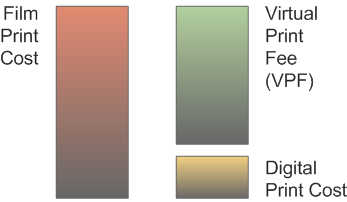
Virtual Print Fee (VPF) Neutral Cost Structure
How is the equipment financed?
Financing mechanisms vary. Most deployment entities offer off-balance-sheet financing, where the deployment entity or the bank hold title to the equipment throughout the VPF payment period. Some deployment entities require, and some exhibitors prefer, to finance the equipment themselves.
Do I need to sign up with a 3rd party integrator to gain access to VPF financing?
Generally, yes. If the exhibitor has sufficient scale, studios will consider a deployment deal directly with the exhibitor. However, in such cases, it is the obligation of the exhibitor to negotiate equivalent deals with each studio. More often than not, exhibitors start this process, but never complete it. Successful deployent entities are usually a collaboration of several exhibitors. In many cases, the collaboration is driven by a local equipment dealer who is motivated to complete the process. By developing scale, exhibitors reduce the cost per screen of managing the deal. If there is agreement to buy the same make of equipment, the exhibitors may also benefit through volume discounts.
Who do I talk to about financing and virtual print fee plan?
Exhibitors with sufficient resources can talk directly to studios, in which case they will be responsible for negotiating with each studio independently, as well as the bookkeeping and mangement of the VPF deal. A faster course is to arrange to receive VPFs through a digital cinema deployment integrator. Cinedigm, a major integrator in the US, can no longer accept new exhibitor applications for its US digital cinema rollout. However, Cinedigm is now undertaking a new rollout for independent exhibitors in Australia. European integrators include Arts Alliance Media in the UK, DCinex in Belgium, or Ymagis in France. Asia-based integrators include GDC Technology in Hong Kong, DCinema Alliance (Arrays Technology) in Philippines, and Scrabble in India. Sony Digital Cinema also offers VPF deals in several countries.
Is DCI the authority behind the VPF model?
There is no connection between DCI, the joint venture of the six major studios, and the studio willingness to pay VPFs. DCI’s sole contribution to digital cinema is its oversight of the DCI Specification.
Why is the financing of digital cinema so challenging?
VPF-financed equipment managed by a deployment entity is not the usual asset-backed financing deal that banks seek. If the exhibitor is not the guarantor of the loan, then another entity must do so. The relationship between parties can be complex, making these deals difficult for banks to understand and increasing the apparent risk. This is shown in the diagram below:
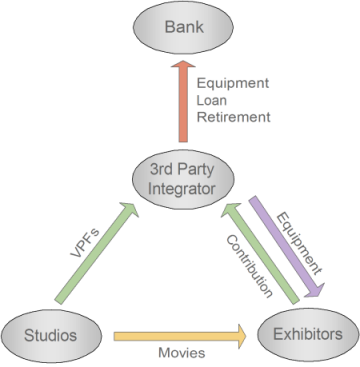
Typical Virtual Print Fee (VPF) Relationship of Parties
The strength of the VPF is that it rests on the delivery of movies by multiple studios. The strength of box office combined with the large number of movie distributors results in a relatively safe cash flow. However, it takes time to recoup costs. Digital projectors are a relatively new technology, and the replacement cycle and potential obsolescence factor is hard to gauge.
Why can’t a studio simply credit film rental?
Studios seek the minimum impact on the exhibitor-distributor relationship when paying VPFs. As such, they seek to maintain an arms-length relationship between themselves, the ownership of equipment, and the exhibitor’s operations.
Why is 3-D a driver for digital cinema? Does 3-D cost extra?
The early popularity of 3-D movies drove the adoption of digital projection. Up until the introduction of digital 3-D projection, there was little value added to exhibitor operations by converting to digital cinema. To show 3-D in digital, add-on technology is required in addition to the purchase of a digital projector. These costs are not covered by virtual print fee payments. Companies such as RealD, Dolby, Master Image, and XpanD are the the primary companies marketing add-on technology and glasses. Note that the cost of the 3-D add-on technology cannot be included in the total system cost to be recouped through VPFs. The technical differences in the various add-on technologies is discussed in Technology FAQs at Cinepedia.
Are all digital cinema projectors capable of High Frame Rates (HFR)?
No. All TI Series 1 projectors, and all Sony projectors installed to date, will not support HFR. TI Series 2 projectors will support HFR with a software upgrade and an HFR-capable In-projector Media Block (IMB) installed. Sony projectors will become HFR capable with a future hardware/software upgrade.
Does DCI require High Frame Rate (HFR) support?
No. DCI does not require or test for HFR capability in digital cinema equiupment. However, DCI issued a “Recommended Practice” in October 2012 to guide filmmakers in the practical production of HFR movies. SMPTE conducted a study of HFR requirements for future generations of digital cinema equipment. You can learn more about this by reading the Report from the SMPTE High Frame Rates Study Group at mkpe.com.
What is the value of 4K and HFR to my audience?
4K resolution can only be perceived by audience members that sit up close to the screen. This limitation is caused solely by the human visual system, and has nothing to do with the projection technology. In most auditoriums, the front seats are not the ones that the audience places a high value on. Thus, the most basic challenge faced by the 4K format is that it does not offer a clear-cut value proposition in most auditoriums.
Large format theatres, however, tend to place audiences up close to the screen to create an immersive experience. Such auditoriums can benefit from 4K projection. Having said that, getting 4K content is an entirely different matter.
High Frame Rate (HFR) is a projection system capability that can be perceived from any seat in the house. Where HFR presents a clear difference to audiences is with motion. Pans can be faster. In addtion, as motion becomes less blurred, our peripheral vision detects more information, leading to a more immersive experience. The skill to which these perceptions are exercised is in the hands of the director and cinematographer. Simply shooting in HFR does not necessarily make a movie more interesting to watch.
Should I wait and buy used digital cinema equipment?
It’s unlikely that there will be a significant used equipment market in digital cinema, for several reasons:
- Unlike film projection equipment, digital projection equipment has an estimated 10-15 year lifetime. If you buy a projector that is 5 years old, then you could have 5 years of life left. Lifetime is limited by parts availability and the obsolescence factors associated with high technology. While a part for an old film projector can be custom machined in the worst case, no such fall-back is possible with sophisticated digital equipment. Semiconductor technology changes quickly, and the investment required to
re-engineer the circuit boards of old products with new parts is better put to work in developing entirely new products. If you’ve ever tried to repair a 10-year-old personal computer, then you understand the problem. - Warranty can be an issue in financing used equipment. Deployment deals require a 10-year extended warranty on equipment. Unless the extended warranty is included in the used-equipment sale, it will not transfer.
- Further, early replacement cycles are costly. If it’s hard to secure loans for 1st time digital equipment expenditures, then it’s unlikely that exhibitor’s will undergo the process again in 5 years. Consider that for DCIP screens, this would amount to $1B of capex every 5 years, versus every 10 years.
A pragmatic strategy for purchasing equipment must take into account the limited lifetime it has and the re-investment in capex required every 10-15 years. Waiting to convert has proven to be a beneficial strategy for many exhibitors, as pricing has come down over time, and financing has become more readily available. But if you are waiting for used equipment, you should consider the points above.
Is compliance with the DCI specification sufficient to receive a digital movie?
Generally, the answer is “yes.” Some studios require the exhibitor to sign a separate digital rental agreement to the existing film rental agreement, which may stipulate further requirements that must be met. It is important to note that owning a digital projector does not necessarily cause a change in booking pattern. If you’re expecting to convert from 2nd run to 1st run through the purchase of a digital projector, it’ best to first discuss this with your distributors.
Are there any restrictions I should know about?
In a VPF deal, the exhibitor is expected to maintain the equipment. If shows are lost due to maintenance issues, you may lose the VPF for that movie. Also, you will be expected to maintain a high quality Internet connection to each site. The Internet connection is necessary to pull security and performance logs for reconciliation by the deployment entity with studio-provided booking reports.
When will film distribution end?
The short answer is sooner than you may think. It may surprise you to learn that studios are not in control of the availability of film prints. The deciding factor will be the manufacturers of print stock. The US will be approximately 85% digital by end of 2012. Cinemas worldwide, including the US, will be approximately 70% digital by the end of 2012. The two major suppliers in the world of motion picture print stock are Kodak and Fuji. As you can see, by the end of 2012, these companies will have lost 70% of their motion picture print stock business. In September 2012, Fuji accepted its last orders for print stock, and announced that it will discontinue the manufacture of print stock in March 2013. That leaves Kodak, which declared bankruptcy in January 2012. Whether or not Kodak continues to manufacture print stock depends on the actions of the US court overseeing it. It is entirely possible that motion picture film print stock will cease to be available by the end of 2013.